There are no items in your cart
Add More
Add More
| Item Details | Price | ||
|---|---|---|---|

Top 8 NGINX Use Cases Explained
A Clear, Easy-to-Understand Architectural Guide to NGINX as an API Gateway, Authentication Perimeter, Canary Load Balancer, and Streaming Engine
Many developers start out assuming NGINX is just a basic web server used to host static HTML files. In modern production environments, however, NGINX acts as a central high-performance traffic control plane for APIs, microservices, and media streams.
Here is the visual summary of the Top 8 Production NGINX Use Cases powering modern web applications:
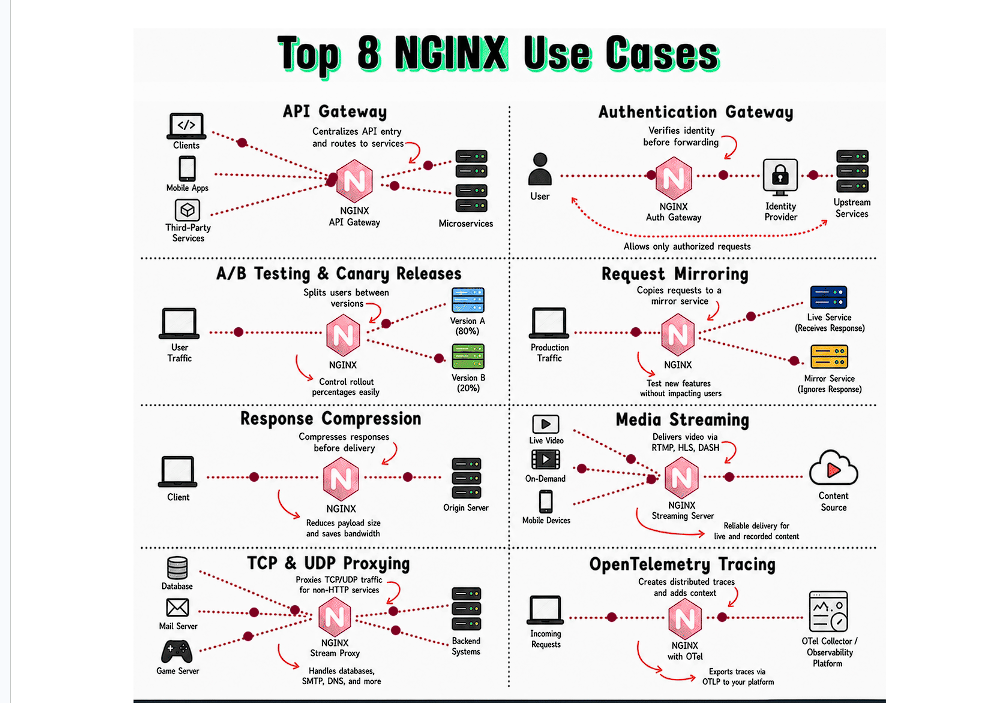
Below is a quick overview of all 8 capabilities explained in this guide:
Centralizes API traffic & routes requests to backend microservices.
Verifies user tokens & identity before forwarding requests.
Splits traffic percentages (e.g. 80/20) to test new software versions.
Duplicates live production traffic to a test service risk-free.
Compresses JSON/HTML payloads to save bandwidth and speed up responses.
Streams live video and VOD using HLS, DASH, and RTMP protocols.
Proxies non-HTTP traffic for databases, mail, DNS, and game servers.
Injects distributed tracing context headers across microservices.
What it does: Centralizes all incoming API requests from clients (Web browsers, Mobile Apps, Third-party integrations) and routes them to the correct backend microservice based on the URL path or headers.
Why it's essential: Instead of clients having to remember dozens of microservice IP addresses (e.g., users.mycompany.com, orders.mycompany.com, payments.mycompany.com), clients send all requests to a single domain name. NGINX inspects the path and routes accordingly.
server {
    listen 80;
    server_name api.mycompany.com;

    # Route User requests to User Microservice
    location /api/v1/users {
        proxy_pass http://user_service_backend;
    }

    # Route Order requests to Order Microservice
    location /api/v1/orders {
        proxy_pass http://order_service_backend;
    }

    # Route Payment requests to Payment Microservice
    location /api/v1/payments {
        proxy_pass http://payment_service_backend;
    }
}What it does: Verifies the identity and permissions of an incoming request (e.g., validating JWT tokens or OAuth2 credentials) before forwarding the request to internal upstream microservices.
Why it's essential: Backend microservices don't need to duplicate complex token-checking logic. If a request lacks a valid authorization header, NGINX rejects it immediately with an HTTP 401 Unauthorized response, keeping unauthorized traffic off your internal network.
auth_request module, NGINX makes an internal subrequest to an Authentication Service (e.g., Keycloak or OAuth provider). Only if the auth check returns 200 OK does NGINX forward the original request to backend servers.
What it does: Splits live user traffic between different application versions (e.g., 80% to stable Version A and 20% to new Version B) based on client IP, cookies, or weighted percentages.
Why it's essential: Deploying new software updates to 100% of users all at once is risky. Canary releases allow engineers to test new features with a small subset of real users. If bugs or errors spike, NGINX can instantly roll back traffic to Version A with zero downtime.
# Split traffic based on client IP address hash
split_clients "${remote_addr}AAA" $appversion {
    80%     http://backend_version_a; # Stable Release
    20%     http://backend_version_b; # Canary Release (20% traffic)
}

server {
    listen 80;
    location / {
        proxy_pass $appversion;
    }
}What it does: Copies real incoming production requests and sends an exact duplicate to a secondary test service, while delivering the primary response to the real user from the live service.
Why it's essential: It allows developers to test brand-new features, database optimizations, or refactored code under authentic, heavy production traffic without any risk to real users. If the mirror test service crashes or responds slowly, NGINX simply discards the mirror response!
location /service {
    proxy_pass http://live_production_service; # Real User Traffic
    mirror /mirror_target;                     # Duplicate Request
}

location = /mirror_target {
    internal;
    proxy_pass http://test_staging_service;    # Mirrored Test Target
}What it does: Automatically compresses text-based server responses (JSON, HTML, CSS, JavaScript) on the fly before sending them over the internet to client browsers.
Why it's essential: Large JSON responses (e.g. 2 MB) can take several seconds to transfer on mobile 4G/5G networks. NGINX compresses the payload by up to 70–80% (shrinking 2 MB down to ~300 KB), drastically reducing page load times and saving cloud egress bandwidth costs.
gzip on;
gzip_types text/plain text/css application/json application/javascript text/xml;
gzip_comp_level 6; # Optimal balance of compression ratio vs CPU usage
gzip_min_length 1000;What it does: Acts as a streaming media server, converting live video feeds and recorded files into adaptive bitrate streaming protocols like HTTP Live Streaming (HLS), MPEG-DASH, and RTMP.
Why it's essential: Modern platforms like Netflix, YouTube, and Twitch don't send raw video files to viewers. NGINX chunks video into tiny 2-to-6 second segments and serves the appropriate quality based on the viewer's current internet speed, preventing buffering.
What it does: Operates at the Transport Layer (OSI Layer 4) to load-balance and proxy non-HTTP traffic such as MySQL, PostgreSQL, Redis, DNS resolvers, SMTP mail servers, and real-time multiplayer game servers.
Why it's essential: Not all network communication uses HTTP/REST. Using NGINX's stream module, you can load-balance raw TCP socket connections and UDP datagrams across database read-replicas or game server clusters with minimal overhead.
stream {
    upstream mysql_read_replicas {
        server db1.internal:3306;
        server db2.internal:3306;
    }

    server {
        listen 3306; # Proxies raw TCP MySQL traffic
        proxy_pass mysql_read_replicas;
    }
}What it does: Injects W3C Trace Context headers (e.g. traceparent: 00-4bf92f3577b34da6a3ce929d0e0e4736-00f067aa0ba902b7-01) into incoming requests and exports telemetry trace spans to an OpenTelemetry Collector or APM tool (Jaeger, Zipkin, Datadog, Grafana Tempo).
Why it's essential: In a distributed architecture with 30+ microservices, diagnosing why a request took 5 seconds is impossible without distributed tracing. NGINX tags the request at the front door so you can trace its exact journey through every backend service.
A quick reference breakdown comparing OSI layer, primary module, and main production benefits for all 8 NGINX use cases:
| Use Case | OSI Layer | Key Directives / Modules | Primary Production Benefit |
|---|---|---|---|
| 1. API Gateway | Layer 7 (HTTP) | proxy_pass, location |
Centralizes API endpoints & decouples clients from microservice IPs |
| 2. Auth Gateway | Layer 7 (HTTP) | auth_request |
Stops unauthorized requests at the perimeter before touching backends |
| 3. Canary Releases | Layer 7 (HTTP) | split_clients, upstream |
Enables low-risk, weighted traffic deployment of new application versions |
| 4. Request Mirroring | Layer 7 (HTTP) | mirror, mirror_request_body |
Tests new features under authentic production load with zero risk |
| 5. Compression | Layer 7 (HTTP) | gzip, brotli |
Reduces payload size by up to 80% & lowers cloud bandwidth billing |
| 6. Media Streaming | Layer 7 (HTTP) | http_hls_module, rtmp |
Streams live video and VOD adaptively without client buffering |
| 7. TCP/UDP Proxying | Layer 4 (Transport) | stream { ... } |
Load balances databases, DNS, SMTP, and game servers |
| 8. OTel Tracing | Layer 7 (HTTP) | ngx_otel_module |
Provides end-to-end distributed observability across microservices |
Common real-time architectural questions regarding NGINX deployment:
Answer: Layer-4 Proxying (Stream) operates at the TCP/UDP transport level without reading HTTP headers or URL paths—it simply routes raw data packets (ideal for databases or game servers). Layer-7 Proxying (HTTP) inspects HTTP requests, headers, cookies, and URI paths to make intelligent routing, rewrite, and authentication decisions.
Answer: Nothing happens to your real users! NGINX fire-and-forgets mirrored requests. The mirror response is completely ignored and discarded by NGINX. The real user only receives the response from the live production service.
Answer: Cloud providers (AWS, Azure, GCP) charge egress fees per gigabyte of outbound internet data transfer. By enabling Gzip or Brotli compression, NGINX reduces text payload sizes by up to 80%, directly cutting egress bandwidth expenses while making web pages load significantly faster.
Answer: Centralizing authentication at NGINX prevents unauthenticated malicious traffic from reaching backend servers, saving compute resources. It also eliminates duplicate auth code across microservices written in different languages (NodeJS, Python, Go, Java).