There are no items in your cart
Add More
Add More
| Item Details | Price | ||
|---|---|---|---|

Kubernetes HPA vs. KEDA
Choose the Right Autoscaler for Your Workloads: Resource-Based vs Event-Driven Kubernetes Autoscaling
One of the most common architecture decisions in Kubernetes is choosing how to scale pod replicas under load. Should you scale based on hardware metrics (CPU / RAM) using Horizontal Pod Autoscaler (HPA), or scale based on business queue events using Kubernetes Event-driven Autoscaling (KEDA)?
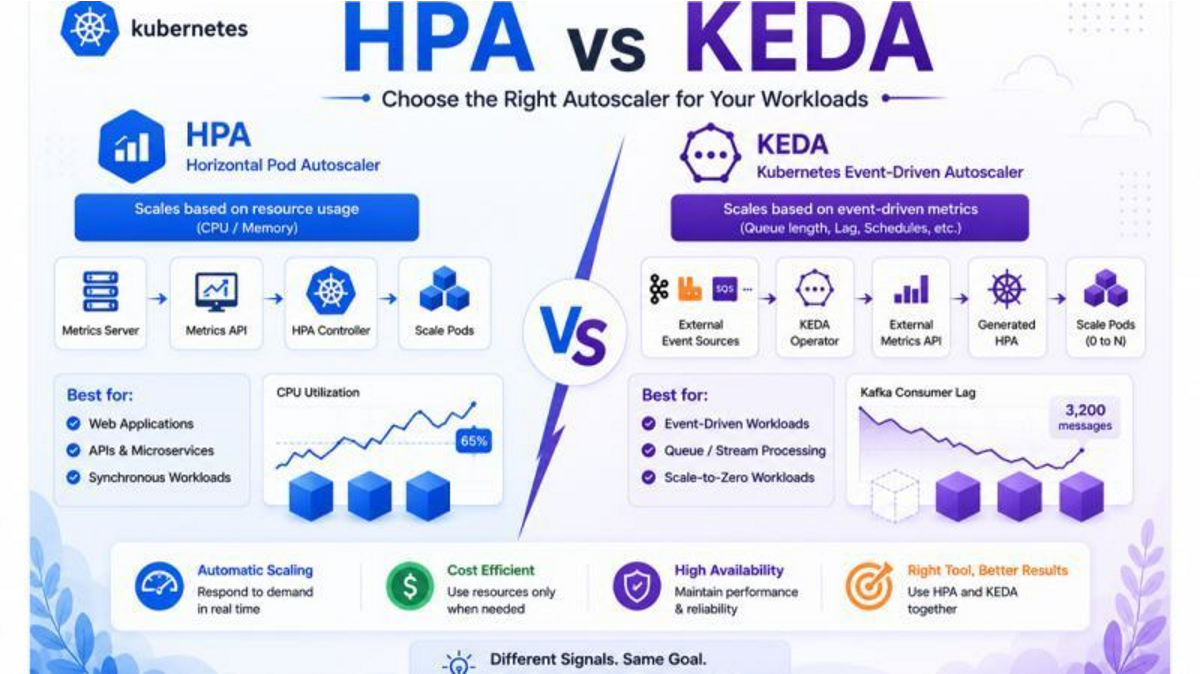
Primary Scaling Signal: Resource Usage (CPU % & Memory Bytes).
Metrics Server ➔ Metrics API ➔ HPA Controller ➔ Scale Pods
Primary Scaling Signal: External Events (Queue depth, Consumer lag, Schedules, Metrics).
External Event Sources ➔ KEDA Operator ➔ External Metrics API ➔ Generated HPA ➔ Scale Pods (0 to N)
Responds to real-time user traffic and queue spikes instantly without manual intervention.
Scale-to-zero capabilities with KEDA ensure idle consumer workers consume zero cloud nodes.
Maintains target latency, SLA uptime, and zero request drops during unexpected traffic floods.
Use HPA for HTTP Web APIs and KEDA for Async Queue Workers in the same Kubernetes cluster!
apiVersion: autoscaling/v2
kind: HorizontalPodAutoscaler
metadata:
  name: web-api-hpa
spec:
  scaleTargetRef:
    apiVersion: apps/v1
    kind: Deployment
    name: web-api-deployment
  minReplicas: 2
  maxReplicas: 10
  metrics:
  - type: Resource
    resource:
      name: cpu
      target:
        type: Utilization
averageUtilization: 65apiVersion: keda.sh/v1alpha1
kind: ScaledObject
metadata:
name: sqs-order-worker-scaler
spec:
scaleTargetRef:
name: sqs-order-worker-deployment
minReplicaCount: 0 # SCALES TO ZERO WHEN QUEUE IS EMPTY!
maxReplicaCount: 20
triggers:
- type: aws-sqs-queue
metadata:
queueURL: https://sqs.us-east-1.amazonaws.com/123456789012/orders-queue
queueLength: "5" # Scale 1 pod for every 5 pending messages
awsRegion: us-east-1| Feature | HPA (Horizontal Pod Autoscaler) | KEDA (Kubernetes Event-Driven Autoscaler) |
|---|---|---|
| Primary Metric Source | Resource Usage (CPU %, Memory Bytes) | External Events (Kafka, SQS, RabbitMQ, Redis, Cron) |
| Scale to Zero (0 Pods)? | ❌ No (Minimum 1 Pod) | ✅ Yes (Scales down to 0 when queue is empty) |
| Trigger Type | Reactive (Lagging indicator after CPU rises) | Proactive (Leading indicator based on queue backlog) |
| Native K8s Component? | ✅ Yes (Built-in Kubernetes Controller) | 🔌 Custom Resource Definition (CRD Operator) |
| Ideal Use Case | Web APIs, REST Microservices, Ingress endpoints | Queue Consumers, Stream Processors, Async Jobs |
Answer: No! KEDA actually extends HPA. When you create a KEDA ScaledObject, KEDA creates and manages an underlying standard HPA behind the scenes, using its External Metrics API server to feed queue metrics to Kubernetes.
Answer: HPA measures CPU and Memory of running pods. If a deployment has 0 pods, there are no containers to report CPU usage, meaning HPA has no metric to evaluate. KEDA solves this by querying the external queue (e.g. AWS SQS or Kafka) directly to wake up the first pod from 0 to 1.
Answer: Absolutely! In production, you use standard HPA for frontend web services (e.g. NGINX, React, Node.js REST APIs) and KEDA for background worker microservices (e.g. order processors, email senders, video encoders).
Answer: KEDA supports 60+ scalers out of the box, including Apache Kafka, AWS SQS, AWS Kinesis, RabbitMQ, Redis Streams, Azure Service Bus, GCP Pub/Sub, Prometheus, PostgreSQL queries, and Cron schedules.