There are no items in your cart
Add More
Add More
| Item Details | Price | ||
|---|---|---|---|

How Docker Works Internally: Architecture & Low-Level Guide
A Deep Technical Breakdown of Docker Engine Mechanics: Build Contexts, OverlayFS Union Filesystems, Linux Namespaces, Cgroups, Virtual Networking, and Storage Drivers
Before diving into the low-level mechanics, understand the 4 foundational pillars that give Docker containers near-bare-metal performance and instant isolation:
No guest OS or hypervisor. Runs as native isolated Linux host processes with near-zero boot delay.
Combines immutable read-only image layers with a thin writable container layer via Copy-on-Write (CoW).
Uses Linux Namespaces (PID, NET, MNT, UTS) for workspace isolation and Cgroups v2 for resource caps.
Connects container eth0 to host docker0 Layer-2 bridge with kernel iptables port forwarding.
The visual summary below illustrates the 14 core mechanics of Docker containerization—from image build context evaluation to kernel namespaces, bridge networking, and layer cache registries:
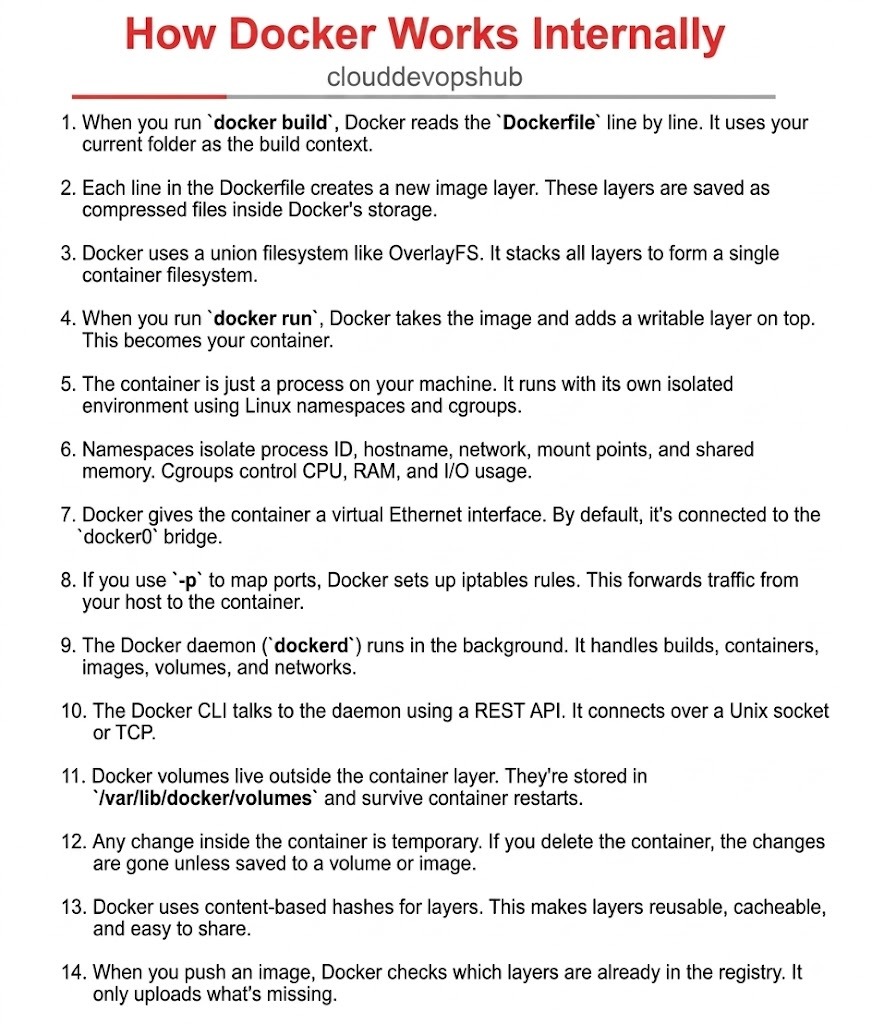
When executing docker build -t app:v1 ., the CLI archives your current working directory (the build context) and sends it over the REST API socket to dockerd. Docker parses the Dockerfile sequentially, evaluating each instruction (FROM, RUN, COPY, WORKDIR). To prevent transferring unnecessary large files (like node_modules or .git), engineers construct a .dockerignore file, ensuring optimal build context transfer speeds and minimal daemon payload size.
$ docker build -t myapp:v1 .
Sending build context to Docker daemon  2.048MB
Step 1/5 : FROM node:18-alpineEvery modifying instruction in a Dockerfile (such as RUN apt-get update or COPY . /app) generates a read-only filesystem layer stored as a compressed tarball inside /var/lib/docker/overlay2. Each layer records only the deltas—the exact file additions, modifications, or deletions made during that step. By minimizing layer bloat and chaining commands (using &&), developers produce lightweight, efficient container images optimized for rapid distribution across clusters.
# Optimized single-layer execution
RUN apt-get update && apt-get install -y --no-install-recommends \
    curl ca-certificates \
&& rm -rf /var/lib/apt/lists/*Docker leverages Linux Storage Drivers like OverlayFS (overlay2) to combine multiple distinct read-only image layers into a unified root directory structure. OverlayFS stacks lower read-only directories (lowerdir) underneath a top thin read-write layer (upperdir) and exposes a merged view (merged) to the process. This copy-on-write architecture allows thousands of containers to instantly share the identical base OS layers without duplicating disk storage across host nodes.
/var/lib/docker/overlay2/<layer_id>/
├── lowerdir  # Base read-only image layers
├── upperdir  # Container read-write layer
├── workdir   # OverlayFS internal atomic workspace
└── merged # Unified rootfs presented to containerExecuting docker run -d --name web app:v1 instantiates a container by taking the read-only image layer stack and mounting a thin, ephemeral read-write layer on top (known as the Container Layer). Any file created, modified, or deleted during runtime is written exclusively to this top layer via Copy-on-Write (CoW). The underlying base image remains untouched and immutable, allowing multiple concurrent containers to instantiate from the same parent image safely.
$ docker run -d --name web-server -p 8080:80 myapp:v1
c4f82a901b3d7e8f9a0b1c2d3e4f5a6b7c8d9e0fUnlike resource-heavy Virtual Machines requiring dedicated guest operating systems and hypervisors, a Docker container is simply a standard Linux host process running inside an isolated execution environment. Docker achieves native virtualization by orchestrating fundamental Linux kernel primitives: Namespaces (for workspace isolation) and Control Groups or Cgroups (for resource constraint enforcement). This lightweight architecture grants containers near-bare-metal performance with zero hypervisor virtualization overhead or boot delays.
Linux Namespaces partition kernel resources so that a process inside a container sees its own isolated view of the system. PID namespace hides host processes, NET namespace isolates network interfaces and routing tables, MNT namespace isolates filesystem mount points, and UTS isolates hostnames. Simultaneously, Linux Cgroups (cgroups v2) strictly govern resource limits—capping CPU cycles, memory allocation (--memory="512m"), and disk I/O throughput to prevent single container starvation.
$ docker run -d --memory="512m" --cpus="1.5" --name secure-app myapp:v1Upon container initialization, Docker creates a virtual Ethernet pair (veth pair). One end of the pair is attached inside the container's isolated network namespace as eth0, while the opposite end attaches to the host's default virtual bridge interface (docker0). The docker0 bridge operates as a virtual Layer-2 switch, assigning private IPv4 subnets (typically 172.17.0.0/16) to containers, enabling seamless local inter-container communication across the host.
$ ip addr show docker0
3: docker0: <BROADCAST,MULTICAST,UP,LOWER_UP> mtu 1500 qdisc noqueue state UP
inet 172.17.0.1/16 brd 172.17.255.255 scope global docker0When you execute docker run -p 8080:80 nginx, Docker configures Linux kernel iptables network address translation (NAT) rules inside the DOCKER chain. Incoming TCP packets hitting host port 8080 are intercepted and automatically rewritten to target the container's internal bridge IP address at port 80. This kernel-level packet forwarding enables external internet clients to communicate with containerized applications without exposing private internal container IP structures.
$ sudo iptables -t nat -L DOCKER -n -v
Chain DOCKER (2 references)
 pkts bytes target     prot opt in     out     source               destination
0 0 DNAT tcp -- * * 0.0.0.0/0 0.0.0.0/0 tcp dpt:8080 to:172.17.0.2:80The core engine behind Docker is dockerd, a persistent background daemon service running on the host system. dockerd acts as the central coordinator, delegating image builds, container lifecycle management, volume mounts, and virtual network provisioning to low-level runtimes like containerd and runc. It monitors system health, listens for API calls, enforces security policies, and manages container state transitions across the host operating system.
$ systemctl status docker.service
● docker.service - Docker Application Container Engine
     Loaded: loaded (/lib/systemd/system/docker.service; enabled)
Active: active (running) since Wed 2026-08-12 10:00:00 UTCDocker utilizes a decoupled client-server architecture. When you type commands into the Docker Command Line Interface (CLI), the client translates your request into an HTTP REST API call. By default, communication occurs over a local IPC Unix domain socket (unix:///var/run/docker.sock). For remote cluster management, the daemon can be configured to listen over TLS-secured TCP sockets (tcp://0.0.0.0:2376), allowing external CI/CD pipelines to control the daemon.
$ curl --unix-socket /var/run/docker.sock http://localhost/v1.41/containers/json
[{"Id":"c4f82a901b3d...","Names":["/web-server"],"Image":"myapp:v1","State":"running"}]Because the writable container layer is ephemeral and destroyed when a container stops, production applications rely on Docker Volumes for data persistence. Volumes are host-managed directories created outside the union filesystem in /var/lib/docker/volumes/. Mounting a volume bypasses the Copy-on-Write storage driver, writing data directly to host storage at native I/O speeds. Volumes survive container deletions, container updates, and host restarts intact.
$ docker volume create pg_data
$ docker run -d -v pg_data:/var/lib/postgresql/data --name db postgres:15Container state is design-inherent ephemeral; files written to the top read-write layer are tied directly to the container lifecycle. Executing docker rm -f container_id instantly purges that container layer, permanently deleting uncommitted runtime data. To preserve state across deployments, DevOps engineers must explicitly mount persistent named volumes (-v mydata:/app/data) or commit container changes into a new immutable image tag (docker commit), enforcing stateless application design principles.
Every Docker image layer is identified by a unique SHA-256 cryptographic content hash calculated from its file contents. This content-addressable storage model enables aggressive layer caching during builds. If a layer’s hash matches a previously compiled layer, Docker reuses the existing cached layer instead of re-executing build commands. This dramatically accelerates CI/CD pipeline build times and optimizes disk storage utilization across shared host systems.
$ docker inspect myapp:v1 --format='{{json .RootFS.Layers}}'
["sha256:7297e6e6118d...","sha256:b1d7d23a1a5e...","sha256:8f4c2e61a0b1..."]When executing docker push myrepo/app:v1 to remote container registries like Docker Hub or Amazon ECR, Docker checks the SHA-256 digests of all image layers against the target registry. If a base OS layer (such as ubuntu:22.04 or node:18-alpine) already exists in the registry, Docker skips uploading it, transferring only new or modified delta layers. This deduplication saves massive network bandwidth and deployment time.
$ docker push myregistry.com/myapp:v1
7297e6e6118d: Layer already exists
b1d7d23a1a5e: Layer already exists
8f4c2e61a0b1: Pushed
v1: digest: sha256:9f8e7d... size: 1420A side-by-side comparison of low-level system components between traditional hypervisor virtualization and native Docker containerization:
| Architectural Component | Traditional Virtual Machines (VMs) | Docker Containers |
|---|---|---|
| Virtualization Primitive | Hypervisor (KVM, ESXi, Hyper-V) | Linux Kernel Namespaces & Cgroups |
| Guest Operating System | Full Guest OS per VM (GBs footprint) | Shared Host OS Kernel (MBs footprint) |
| Filesystem Engine | Virtual Disk Image (vmdk, qcow2) | OverlayFS (overlay2) Copy-on-Write (CoW) |
| Boot Overhead | Minutes (Full OS POST & init sequence) | Milliseconds (Instant process spawn) |
| Resource Constraints | Static vCPU & RAM pre-allocation | Dynamic Linux Cgroups v2 throttling |
| Network Isolation | Virtual NICs & vSwitches | veth pair connected to docker0 bridge |
| Data Persistence | Attached Virtual SAN / EBS Volume | Bypassed Volume Mounts (/var/lib/docker/volumes) |