There are no items in your cart
Add More
Add More
| Item Details | Price | ||
|---|---|---|---|
End-to-End DevSecOps CI/CD Pipeline
From GitHub Commit to Production Kubernetes Deployment with Automated Shift-Left Security Scans & GitOps
Building a modern software delivery pipeline is not just about moving code from a developer's laptop to production. True DevSecOps embeds automated security gates, code quality analysis, vulnerability scanning, and GitOps synchronization directly into every build step.
Here is the architectural workflow for an End-to-End DevSecOps CI/CD Pipeline:
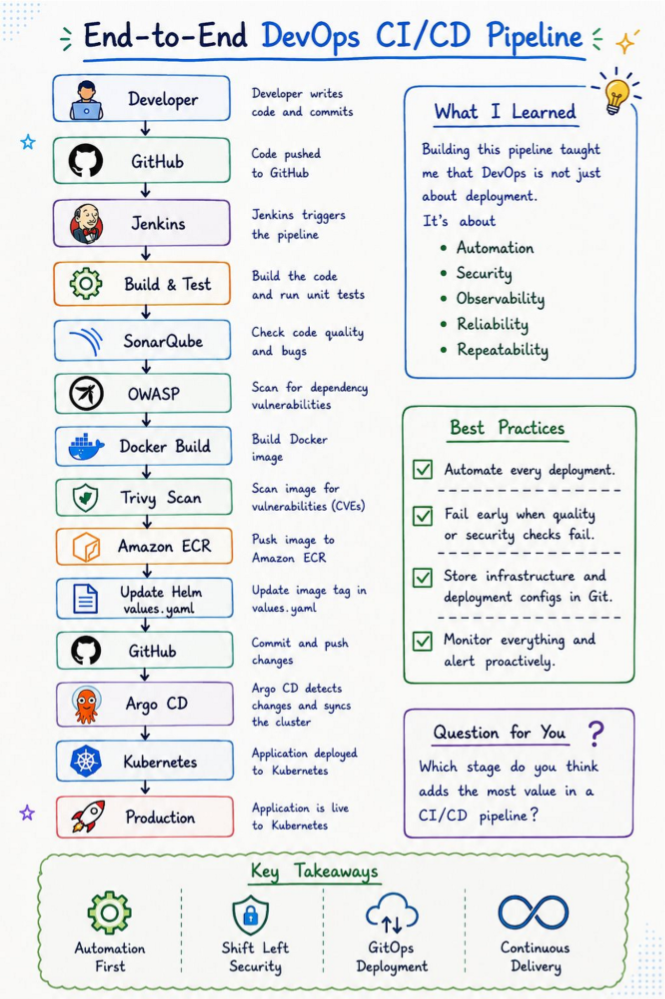
Below is an in-depth, step-by-step architectural breakdown of all 13 automated stages in this enterprise DevSecOps pipeline—explaining the tools used, CLI commands executed, quality gate failure criteria, and why each stage matters in production.
What Happens: A developer writes application feature code and unit test suites on a local feature branch (e.g. feature/auth-service). Before committing, local Git pre-commit hooks (using Husky or Gitleaks) automatically scan the local workspace for accidentally hardcoded credentials, secret keys, or AWS access tokens.
Tools Used: Git, Gitleaks, Husky, IDE linters.
# Check workspace status and commit code
git checkout -b feature/auth-service
git add .
git commit -m "feat: implement JWT authentication endpoint with unit tests"What Happens: The developer pushes the committed code branch to the centralized GitHub repository or opens a Pull Request (PR). GitHub receives the push event and fires an automated HTTP POST Webhook payload containing repository metadata, commit author details, and the unique Git commit SHA (e.g. a1b2c3d) to Jenkins.
Tools Used: GitHub, Git Webhooks.
git push origin feature/auth-serviceWhat Happens: The Jenkins Automation Server catches the incoming GitHub webhook payload. Jenkins provisions an isolated, clean build environment (such as an ephemeral Kubernetes pod agent or Docker worker node), checks out the exact Git commit SHA, and parses the project's Jenkinsfile pipeline definition.
Tools Used: Jenkins, Jenkins Kubernetes Plugin, Declarative Pipeline.
stage('Checkout Source Code') {
    steps {
        checkout scm
        echo "Building Commit SHA: ${GIT_COMMIT}"
    }
}What Happens: Jenkins compiles the application source code into executable binaries and runs the automated unit test suite. If any unit test fails or compilation errors occur, the pipeline halts immediately, marking the build status as FAILED and notifying the team via Slack/Email before any further security stages run.
Tools Used: Maven, Gradle, npm, Go build, JUnit, Jest.
# Example Maven build & unit test command
mvn clean test -DskipTests=falseWhat Happens: Static Application Security Testing (SAST). SonarQube scans raw source code line-by-line to detect code smells, potential logic bugs, security hotspots (e.g. unhandled null pointers, SQL injection risks), and unit test coverage percentage.
Quality Gate Criteria: The pipeline blocks progress if code coverage drops below 80% or if any CRITICAL or BLOCKER security vulnerability is identified.
stage('SonarQube SAST Scan') {
    steps {
        withSonarQubeEnv('SonarQubeServer') {
            sh 'mvn sonar:sonar -Dsonar.projectKey=my-devsecops-app'
        }
        // Fail pipeline if Quality Gate fails
        timeout(time: 5, unit: 'MINUTES') {
            script {
                def qg = waitForQualityGate()
                if (qg.status != 'OK') {
                    error "Pipeline aborted due to SonarQube Quality Gate failure: ${qg.status}"
                }
            }
        }
    }
}What Happens: Software Composition Analysis (SCA). OWASP Dependency-Check scans all third-party open-source libraries and packages (e.g. pom.xml, package.json, requirements.txt) against the National Vulnerability Database (NVD) to identify known Common Vulnerabilities and Exposures (CVEs).
Failure Threshold: If any imported open-source dependency has a CVSS score >= 7.0 (High/Critical vulnerability), OWASP Dependency-Check aborts the build.
dependency-check.sh --project "DevSecOps-App" \
                     --scan ./ \
                     --format "ALL" \
--failOnCVSS 7What Happens: Once source code quality and third-party libraries pass inspection, Docker Engine packages the verified application binary and runtime environment into an immutable container image. The image is tagged with the exact Git commit SHA (e.g. my-repo/my-app:v1.0.0-a1b2c3d) to guarantee complete traceability.
Tools Used: Docker Engine, Multi-stage Dockerfiles.
docker build -t 123456789012.dkr.ecr.us-east-1.amazonaws.com/my-app:${GIT_COMMIT} .What Happens: Container Image Vulnerability Scanning. Aqua Trivy scans the built Docker image layer-by-layer, checking the base operating system packages (e.g. Alpine/Debian/Ubuntu OS packages) and runtime binaries for unpatched CVEs and container misconfigurations.
Failure Threshold: Configured with --exit-code 1 --severity HIGH,CRITICAL so that if any unpatched Critical or High OS vulnerability is detected, Trivy stops the image from ever reaching the registry.
trivy image --exit-code 1 \
            --severity HIGH,CRITICAL \
123456789012.dkr.ecr.us-east-1.amazonaws.com/my-app:${GIT_COMMIT}What Happens: Once Trivy verifies 0 critical vulnerabilities, Jenkins authenticates securely to AWS using short-lived IAM credentials (via AWS STS) and pushes the security-vetted Docker container image to Amazon Elastic Container Registry (ECR).
Tools Used: AWS CLI, Amazon ECR, Docker Push.
# Authenticate Docker against Amazon ECR
aws ecr get-login-password --region us-east-1 | docker login --username AWS --password-stdin 123456789012.dkr.ecr.us-east-1.amazonaws.com

# Push immutable container image
docker push 123456789012.dkr.ecr.us-east-1.amazonaws.com/my-app:${GIT_COMMIT}What Happens: In GitOps, application configuration and deployment versioning are managed via Git repositories. Jenkins uses YAML processors (like yq) to update the container image tag inside the values.yaml file of the dedicated Helm configuration repository, pointing it to the new Git commit SHA.
Tools Used: Helm 3, yq, GitOps repository.
# Update image tag using yq processor
yq eval '.image.tag = "'${GIT_COMMIT}'"' -i helm-chart/values.yamlWhat Happens: Jenkins commits the updated values.yaml manifest back to the remote GitOps Infrastructure repository on GitHub. This commit acts as the explicit, auditable trigger for deployment.
Tools Used: Git, GitHub GitOps Repo.
git config user.name "Jenkins CI Bot"
git config user.email "jenkins-bot@mycompany.com"
git commit -am "chore(deploy): update image tag to ${GIT_COMMIT}"
git push origin mainWhat Happens: Argo CD runs natively inside the Kubernetes cluster as a GitOps continuous delivery controller. It continuously polls the GitOps repository on GitHub. Upon detecting the new commit in values.yaml, Argo CD pulls the updated Helm chart and automatically synchronizes the cluster state to match Git.
Why it's better than `kubectl apply`: Argo CD detects and auto-heals cluster configuration drift, eliminates storing cluster admin credentials in Jenkins, and provides automated 1-click rollbacks!
What Happens: Kubernetes executes a RollingUpdate Deployment Strategy on Amazon EKS. New application pods spin up with the new container image, pass readiness and liveness health checks, traffic is gracefully shifted via Kubernetes Services, and old pods are safely terminated.
Result: Your security-vetted application update is live to global users with zero downtime!
Building this pipeline proves that DevOps is not just about deployment—it's about:
Zero manual steps from code commit to cluster deployment.
Security checks (SonarQube, OWASP, Trivy) run in CI.
Argo CD syncs cluster state continuously from Git.
Zero-downtime rolling updates on Kubernetes.
Answer: "Shift-Left Security" means integrating automated security testing early in the software development lifecycle (during code commit and build phases) rather than waiting until right before or after production deployment. Tools like SonarQube, OWASP Dependency-Check, and Trivy catch vulnerabilities when they are cheapest and easiest to fix.
Answer: Using Argo CD keeps your Kubernetes credentials out of Jenkins, improving security. Argo CD runs inside Kubernetes, continuously monitoring your Git repository for changes and auto-correcting any manual drift in the cluster to ensure Git remains the true single source of truth.
Answer: SonarQube performs Static Application Security Testing (SAST) on application source code (checking for code smells, logic bugs, SQL injection). Aqua Trivy scans the compiled Docker image and underlying Linux OS packages for known CVE vulnerabilities.
Answer: The CI pipeline updates the container image tag in `values.yaml` and commits it to Git. Argo CD monitors the Git repo, detects the modified `values.yaml`, and automatically applies a rolling update to the Kubernetes cluster using the new image from Amazon ECR.