There are no items in your cart
Add More
Add More
| Item Details | Price | ||
|---|---|---|---|

Zero Trust Architecture on AWS
Secure by Design • Least Privilege Access • Verify Every Request • Never Trust, Always Verify
Traditional cloud security relied on a "castle-and-moat" perimeter model: once traffic passed the front door, everything inside the internal network was implicitly trusted. Zero Trust eliminates implicit trust entirely. In a Zero Trust architecture, every single request—whether originating from outside the VPC or between internal microservices—must be authenticated, authorized, and encrypted.
Here is the architectural blueprint for implementing Zero Trust on AWS:
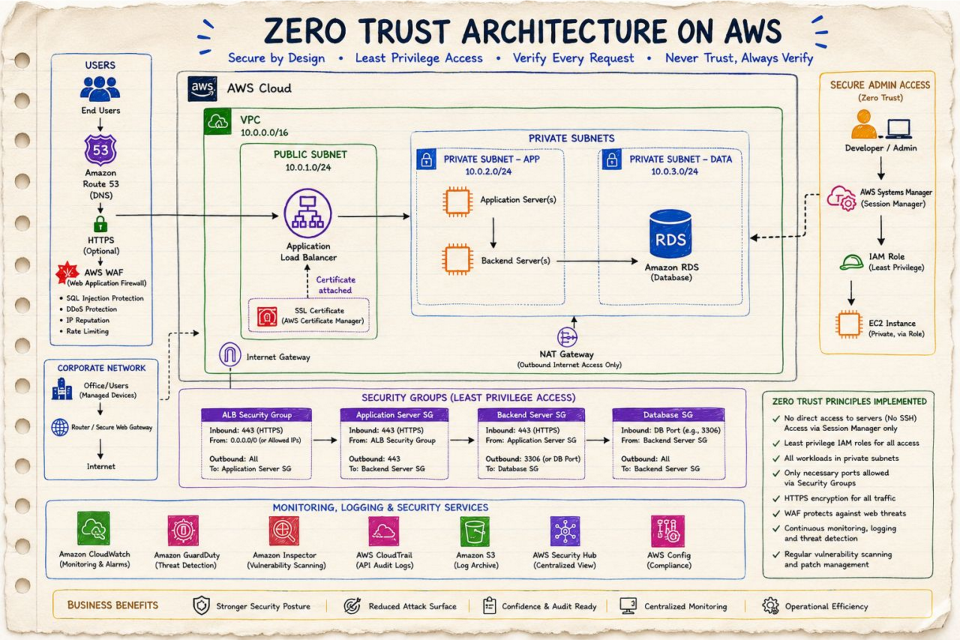
This architectural design strictly enforces 8 mandatory security principles:
Private EC2 servers are completely isolated with no public IP addresses and no open SSH port 22. Administrative access is managed exclusively via AWS Systems Manager Session Manager.
Developers and microservices operate using IAM roles with minimal permissions, preventing unauthorized actions or credential leakage.
All application workloads and databases (RDS) reside inside isolated Private Subnets with no direct ingress from the public internet.
Security Groups are chained strictly so that each tier only accepts traffic from the tier immediately preceding it.
End-to-end SSL/TLS encryption in transit using AWS Certificate Manager (ACM) attached to the Application Load Balancer.
AWS WAF filters malicious exploits (SQL injection, XSS, rate-limiting, IP reputation filtering) at the perimeter.
Continuous intelligent threat detection via Amazon GuardDuty, API audit logging via AWS CloudTrail, and metrics via CloudWatch.
Regular automated vulnerability assessments via Amazon Inspector and compliance tracking with AWS Config & Security Hub.
The network boundary is divided into distinct isolation zones inside an AWS VPC (10.0.0.0/16):
Instead of using loose IP ranges (CIDR blocks), Zero Trust uses Security Group Chaining where each firewall rule explicitly references the Security Group ID of the previous layer:
Traditional cloud setups used Bastion Hosts (Jump Boxes) with open SSH Port 22. In Zero Trust, SSH Port 22 is disabled entirely.
Zero Trust requires continuous monitoring to detect anomalies and enforce compliance across your entire AWS account:
Monitors system health, collects performance metrics, aggregates logs, and triggers operational alarms.
Provides intelligent AI-driven threat detection, identifying compromised EC2 instances, unauthorized IAM access, and unusual API calls.
Automates vulnerability scanning for EC2 software packages and container image vulnerabilities.
Records all API calls and user management actions across the AWS account for audit compliance.
Stores immutable, encrypted audit logs with Object Lock to prevent tamper or deletion by attackers.
Centralized security compliance dashboard tracking configuration history and security standards (CIS, PCI-DSS).
Eliminates perimeter weaknesses and prevents lateral movement by attackers.
No open SSH ports, private subnets for all servers, and WAF protection at the edge.
Complete traceability via CloudTrail, SSM Session Manager logs, and AWS Config tracking.
Single-pane-of-glass visibility into threats via AWS Security Hub and GuardDuty.
Common real-world questions asked in Zero Trust & DevSecOps technical interviews:
Answer: Open SSH port 22 exposes servers to internet brute-force attacks and requires managing public/private key pairs. AWS Systems Manager (SSM) Session Manager eliminates SSH keys and open ports by enabling encrypted CLI access over TLS via IAM roles.
Answer: SG Chaining explicitly references the Security Group ID of the source layer (e.g. Database SG allowing inbound 3306 only from `Backend Server SG`). Unlike IP rules, if servers scale up dynamically, their new IP addresses are automatically accepted without updating firewall rules.
Answer: A NAT Gateway allows servers in private subnets to initiate outbound connections to the internet (e.g. for downloading security updates) while preventing external internet hosts from initiating inbound connections to private servers.
Answer: GuardDuty uses machine learning and threat intelligence to analyze AWS CloudTrail, VPC Flow Logs, and DNS logs continuously. It flags anomalous behavior, such as unauthorized API calls or compromised instances communicating with malicious IP addresses.