There are no items in your cart
Add More
Add More
| Item Details | Price | ||
|---|---|---|---|
12 AWS Concepts Every DevOps Engineer Should Know
A Complete, Beginner-Friendly Architecture Guide to the Core Amazon Web Services Powering Modern Cloud Infrastructure
Amazon Web Services (AWS) offers over 200+ services, which can feel overwhelming for beginners and experienced DevOps engineers alike. However, in production systems, 90% of cloud architectures rely on these 12 core concepts.
Understanding these 12 building blocks will give you the confidence to design, secure, scale, and troubleshoot real-world production environments on AWS.
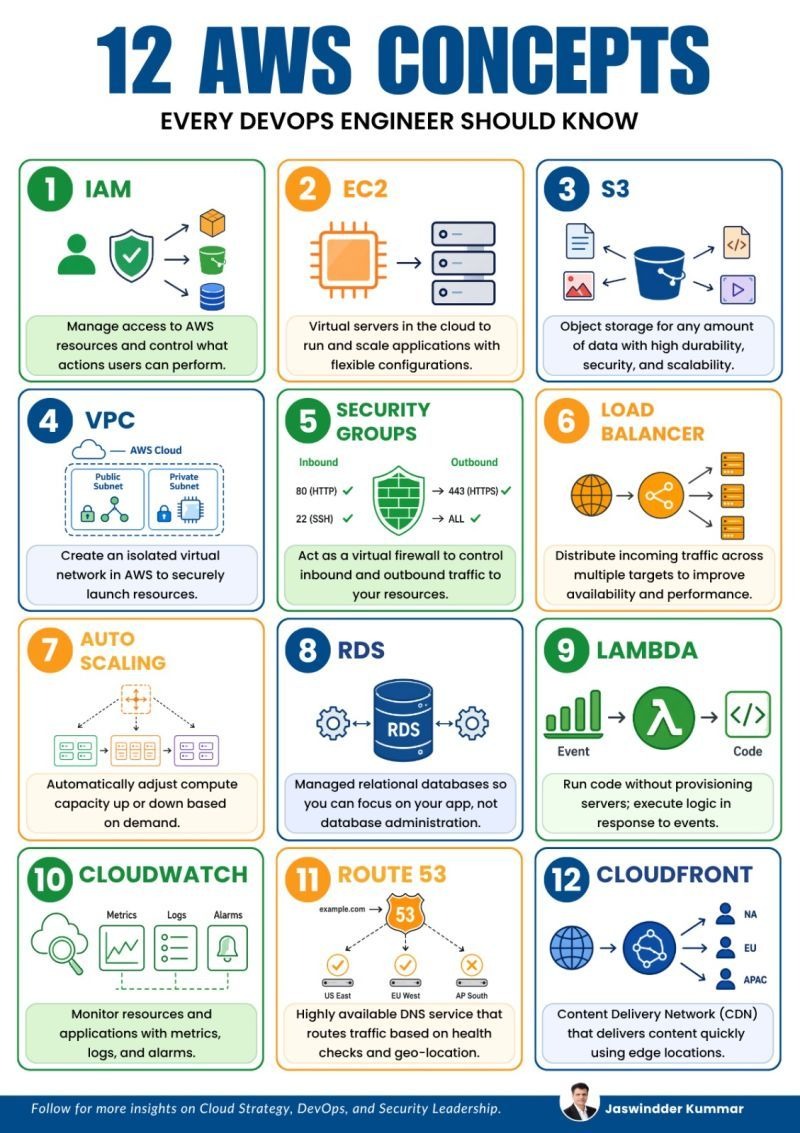
A quick summary of the 12 core AWS services explained in this guide:
Identity & access management, roles, and permissions control.
Virtual compute servers in the cloud with flexible configurations.
High-durability object storage for files, backups, and media.
Isolated private virtual cloud network with subnets.
Stateful virtual firewalls controlling inbound/outbound traffic.
Distributes incoming requests evenly across healthy servers.
Automatically scales EC2 capacity up or down on demand.
Managed relational SQL databases (MySQL, PostgreSQL, Aurora).
Serverless event-driven code execution without servers.
Monitoring dashboard, operational metrics, logs, and alarms.
Scalable DNS web service with health checks & geo-routing.
Global Content Delivery Network (CDN) at edge locations.
What it is: AWS IAM manages access permissions to AWS resources. It controls who (authentication) can perform what actions (authorization) on specific AWS services.
Key Components:
Effect: Allow or Deny for specific API actions.What it is: Amazon EC2 provides resizable virtual servers (called instances) in the cloud. You have full root/administrator control over the operating system (Ubuntu, Amazon Linux, Windows).
Key Concepts:
t3.micro, Compute Optimized c6g.large, Memory Optimized r6g.xlarge).What it is: Amazon S3 is object storage designed for storing and retrieving any amount of data (images, videos, backups, static websites, logs) from anywhere on the web.
Key Benefits:
99.999999999% (11 9s) of data durability across multiple Availability Zones.What it is: AWS VPC lets you provision a logically isolated section of the AWS Cloud where you can launch AWS resources in a virtual network that you define.
Subnet Breakdown:
What it is: A Security Group acts as a stateful virtual firewall for EC2 instances to control inbound and outbound network traffic at the instance level.
Key Characteristics:
What it is: AWS Elastic Load Balancing (ELB) automatically distributes incoming application traffic across multiple EC2 targets, container tasks, or IP addresses to ensure high availability.
Types of Load Balancers:
What it is: AWS Auto Scaling monitors your applications and automatically adjusts compute capacity (scaling EC2 fleets up or down) based on CPU utilization, memory, or custom metrics.
Why it matters: Prevents application crashes during unexpected traffic spikes and saves cloud money during quiet night hours when extra servers aren't needed.
What it is: Amazon RDS makes it easy to set up, operate, and scale relational databases in the cloud (MySQL, PostgreSQL, MariaDB, Oracle, SQL Server, and Amazon Aurora).
Managed Features: AWS automatically handles hardware provisioning, database OS patching, automated daily backups, and Multi-AZ failover replication.
What it is: AWS Lambda allows you to run code without provisioning or managing servers (Serverless). You pay only for the exact milliseconds of compute time consumed when your code executes.
Event-Driven Triggers: Lambda code runs automatically in response to events like an image uploaded to S3, an API call via API Gateway, or a database record change in DynamoDB.
What it is: CloudWatch is a monitoring and management service that collects operational metrics, log files, and sets automated alarms for AWS resources and applications.
Key Features:
What it is: Route 53 is a highly available and scalable Domain Name System (DNS) web service. It connects user requests to infrastructure running in AWS (EC2, S3, ALB).
Advanced Routing Policies: Supports Latency-Based Routing, Geo-Location Routing, Weighted Routing, and Automated DNS Failover based on health checks.
What it is: CloudFront is AWS's global Content Delivery Network (CDN) service that delivers web content, videos, images, and APIs to users with low latency and high transfer speeds via edge locations.
Why it's essential: Instead of a user in Tokyo fetching images from a server in Virginia, CloudFront caches the images at an Edge Location in Tokyo for instant loading.
A structured breakdown categorizing all 12 concepts by functional domain and primary DevOps usage:
| Category | AWS Concept | OSI Layer / Domain | Primary DevOps Responsibility |
|---|---|---|---|
| Security & Auth | 1. IAM | Security & Identity | Enforce least privilege, manage roles and access policies |
| Compute | 2. EC2 | Layer 7 / Compute | Provision virtual servers, configure AMIs & EBS storage |
| Storage | 3. S3 | Object Storage | Store files, backups, data artifacts; block public access |
| Networking | 4. VPC | Network Layer | Design public/private subnets, NAT, and network isolation |
| Security | 5. Security Groups | Layer 3 / 4 Firewall | Configure stateful inbound/outbound firewall rules |
| Traffic Management | 6. Load Balancer | Layer 4 / Layer 7 | Distribute web traffic across healthy server targets |
| Scaling | 7. Auto Scaling | Compute Scaling | Automatically adjust compute fleet capacity on demand |
| Databases | 8. RDS | Database Storage | Manage relational SQL DBs, failover & snapshot backups |
| Serverless | 9. Lambda | Event-Driven Compute | Execute backend logic on-demand without managing servers |
| Observability | 10. CloudWatch | Monitoring & Audit | Monitor system health metrics, central logs & set alarms |
| DNS Routing | 11. Route 53 | DNS & Global Routing | Domain name resolution, geo-routing & failover checks |
| Content Delivery | 12. CloudFront | Global CDN Edge | Cache static/dynamic assets globally for low latency |
Common real-world questions asked in AWS cloud architecture & DevOps technical interviews:
Answer: Security Groups are stateful, applied at the instance level, and evaluate allow rules only. NACLs (Network Access Control Lists) are stateless, applied at the subnet level, and evaluate both allow and deny rules in numbered order.
Answer: Use AWS Lambda for event-driven, short-lived tasks (under 15 minutes) with fluctuating traffic where you don't want to pay for idle servers. Use EC2 for long-running processes, complex stateful applications, legacy software, or workloads requiring dedicated custom hardware control.
Answer: CloudFront caches static content (images, videos, HTML/CSS) at over 600+ global Edge Locations worldwide. When a user requests content, CloudFront serves it directly from the closest geographical edge location rather than querying the origin server thousands of miles away.
Answer: RDS Multi-AZ automatically synchronously replicates database data to a secondary standby instance in a different Availability Zone. If the primary database crashes or undergoes maintenance, AWS automatically fails over to the standby instance with zero data loss and no manual connection string changes.